Contacts Page User Guide
Use this guide to manage contacts, upload files, edit records, export data, and handle GDPR/PII actions.
The contact manager allows you see what contacts are currently on the platform.
The search box allows you to enter a phone number, email or group name and the table will filter
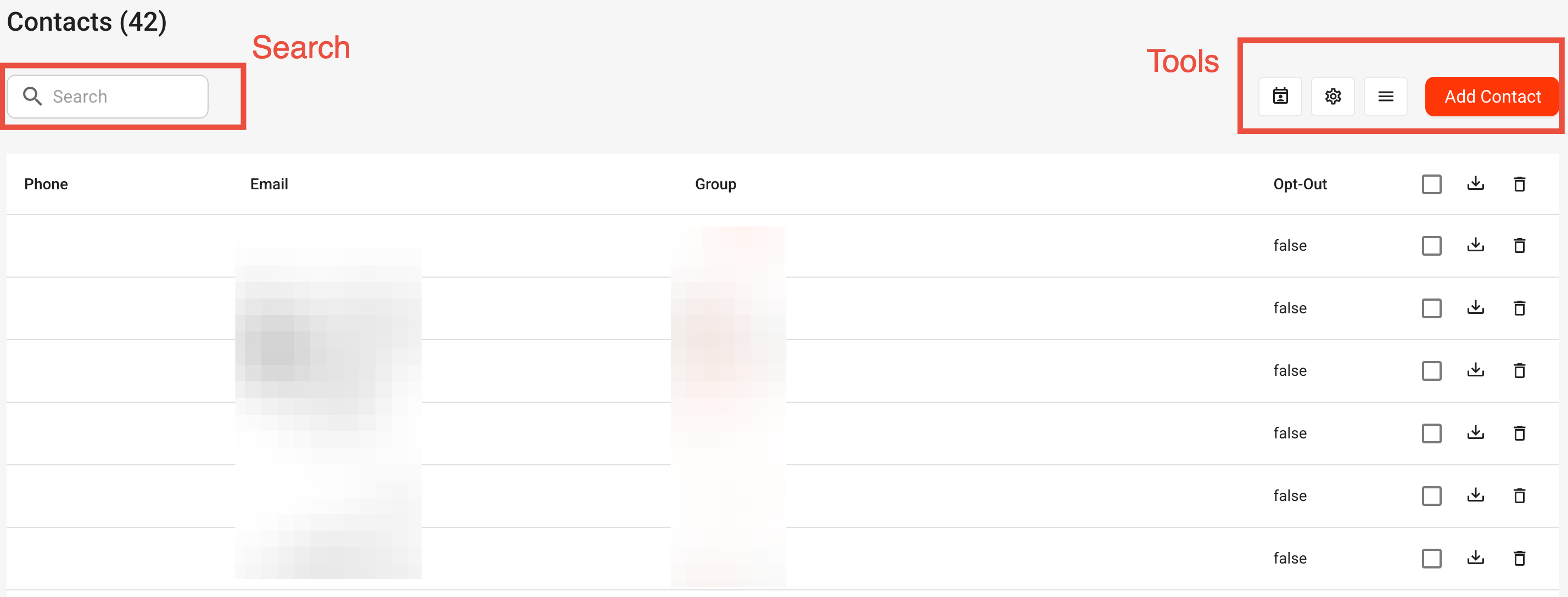
The toolbox contain
- GDPR tool
- PII Settings
- Show Custom Contact Variables
- Add new contacts via uploading a file
The contact manager initially loads and shows the first 10 contacts. You can change this count up to All.
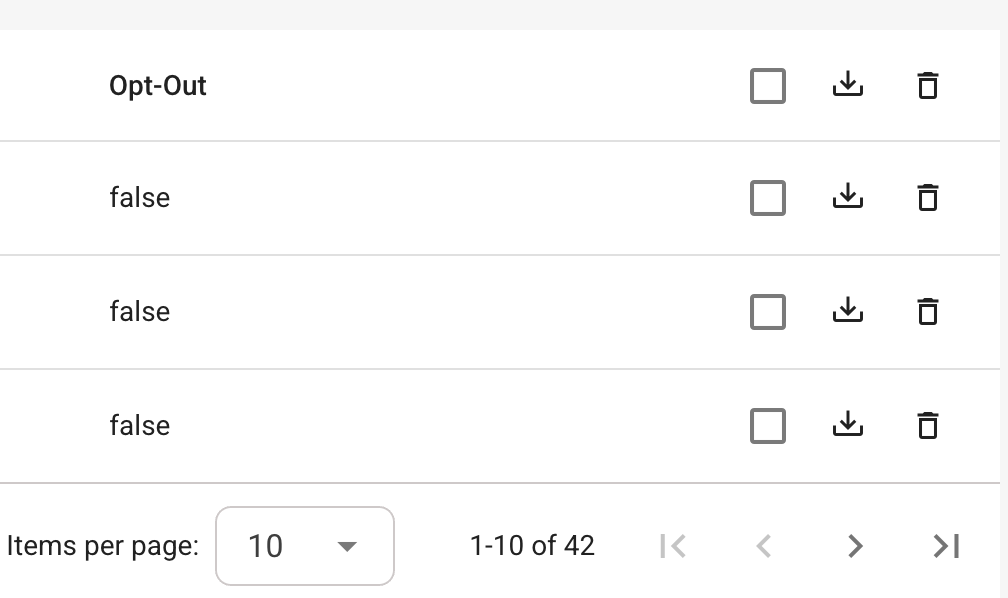
You can delete individual contacts or select multiple contacts. You can also download individual or multiple contacts.
1) Open the Contacts page
- Go to
Contactsin the left menu - At the top, you'll see:
- Search box
- GDPR icon
- PII/Data Retention icon
- Columns menu icon
- Add Contact button
2) Search for contacts
- Click the Search box.
- Type a keyword (name, email, phone, etc.).
- Results update automatically after a short delay.
- To reset results, clear the search text.
3) Add contacts
Option A: Add one contact manually
- Click Add Contact.
- In the popup, click Manually Add New Contact.
- Fill in:
- Name
- Surname
- Phone
- Group
- Click Add.
Note: Name is required, plus at least one of Email or Phone.
Option B: Upload a CSV/XLSX file
- Click Add Contact.
- Drag and drop a
.csvor.xlsxfile into the upload area. - Complete the 3-step uploader flow:
Step 1: Identify columns
- Match your file columns to system fields (Phone, Email, First, Group).
- You can:
- Drag field chips onto headers
- Rename headers
- Delete unwanted columns
- Edit cell values directly
Step 2: Select group
- Set a default group for imported contacts (optional/recommended).
Step 3: Validate contacts
- Validate phone numbers (choose one or more countries if phone column exists).
- Validate email format (if email column exists).
- Invalid rows are highlighted.
- Fix rows manually or click Remove Invalid.
- Click Save to finish import.
4) Show/hide columns
- Click the menu icon (three horizontal lines).
- In the dropdown:
- Click any column name to show/hide it.
- Checkmark = visible, close icon = hidden.
Tip: Exports use the currently visible columns.
5) Inline edit contact fields
- In the table, double-click a cell to edit it.
- Type the new value.
- Press Enter or click outside the field to save.
- Press Esc to cancel.
Important: Inline edit works for regular text fields.Group, Optout, and action columns are not inline-editable.
6) Download contacts as CSV
Download one contact
- Click the download icon on that contact's row.
- A single-contact CSV file downloads.
Download multiple contacts
- Select contacts using row checkboxes.
- (Optional) Use the header checkbox to select all contacts on the current page.
- Click the download icon in the table header actions.
- A CSV file with selected contacts downloads.
7) Delete contacts
Delete one contact
- Click the trash icon on the contact row.
- The contact is deleted immediately.
Delete multiple contacts
- Select contacts with checkboxes.
- Click the trash icon in the table header actions.
- Review the confirmation dialog.
- Click Delete to confirm.
8) GDPR lookup and Opt-Out
- Click the GDPR icon (calendar/account icon) at top-right.
- Enter an email or mobile phone number.
- Click Search.
- Review returned data (if found).
- (Optional) Click Copy Data to copy results.
- In the OptOut section:
- If not opted out, click Opt Out.
- Status updates after success.
9) PII and Data Retention settings
- Click the PII/Data Retention icon (cog icon) at top-right.
- Review:
- Identified PII fields
- Contact Manager retention
- Contact Files retention
- Campaign Data retention
- If your account has permission, update PII and click Save.
Quick tips / common questions
Why can‚t I save import?
You likely still have invalid rows or incomplete validation (especially phone country selection).Does 'Select All' choose every contact in the database?
It selects all contacts currently shown on the current page - if you have 'All shown' then yes it will select all in the database, if you have say 20 selected then it only will select 20.Why are some columns missing?
They may be hidden in the columns menu.What format should Group be in during import?
Single values work; array-style values are also supported.
Was this article helpful?
That’s Great!
Thank you for your feedback
Sorry! We couldn't be helpful
Thank you for your feedback
Feedback sent
We appreciate your effort and will try to fix the article