Select a campaign from the list of Campaigns (1)
Enter a first name (2)
Enter a valid phone number in international format or a valid email in the 'To' field (3)
Press Send (4). Note Send will only be active when a valid Campaign, First name and To is set.
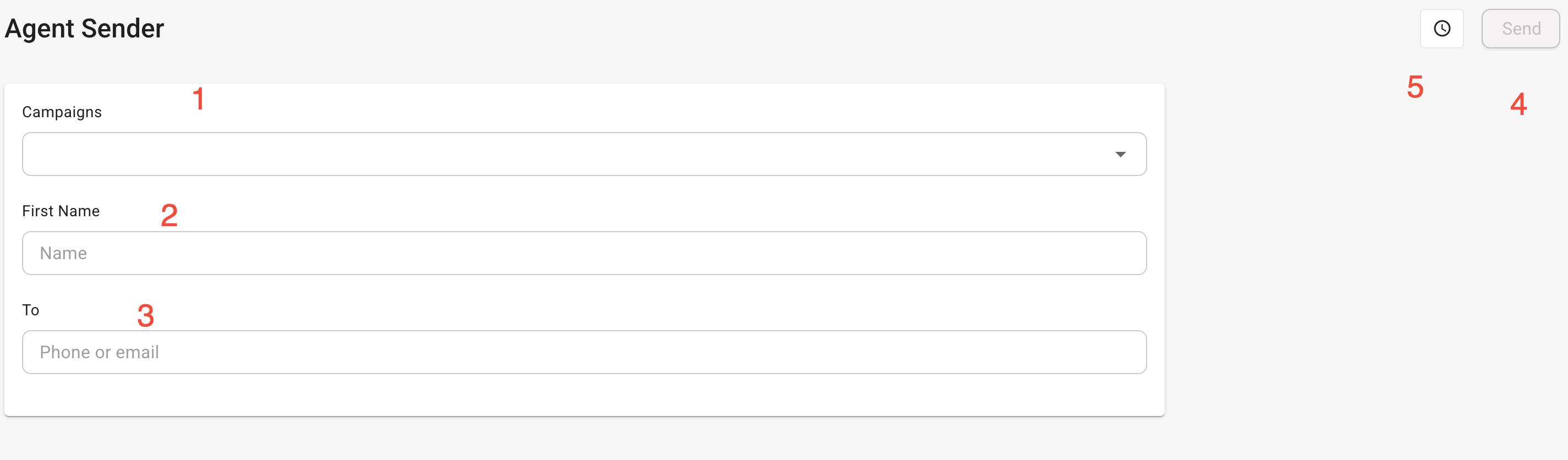
A history of previous sends during this active session can be viewed in (5).
Please note: The agent sender uses the default settings in the Email and/or SMS distribute settings. If they are not set the Agent Sender will fail to send correctly.
Was this article helpful?
That’s Great!
Thank you for your feedback
Sorry! We couldn't be helpful
Thank you for your feedback
Feedback sent
We appreciate your effort and will try to fix the article